How to Uploads File to Website From C Panel
Imprimer- Cpanel, cpanel software
- 48
In today’s web-blog tutorials we will see how clients can upload from cPanel to website. Here is the step-by-step guide.
1.First login to the cPanel website with username and password
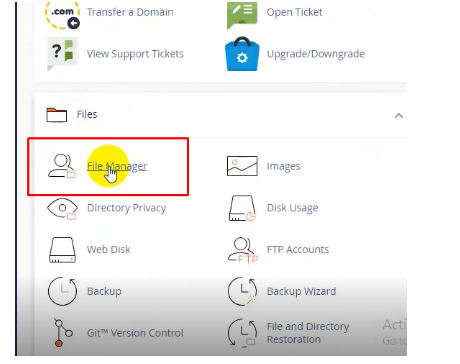
2.Scroll down to ‘Files’ sections and click ‘File Manager’.
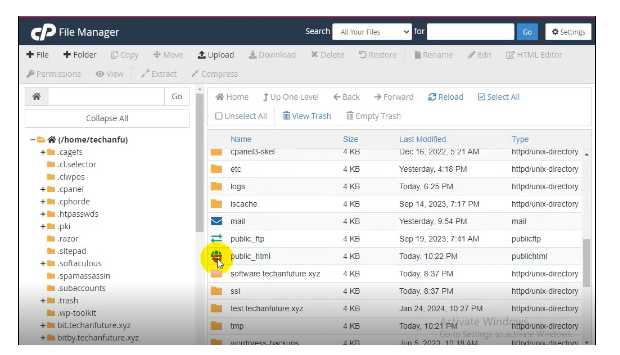
3. In the interface find ‘public_html’ file link, client can upload files. Click on ‘public_html’.
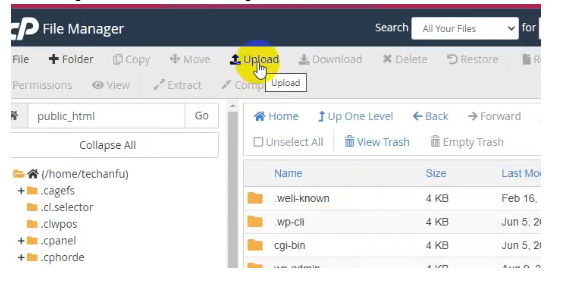
4. Click ‘Upload’ button on the top.
5. Now click ‘Select File’ to select the files to be upload and wait for the files to be uploaded to 100%
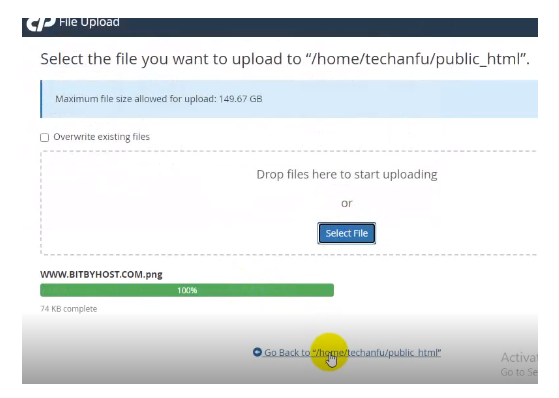
6. Click the above Go Back link and the newly uploaded files can be found
Cette réponse était-elle pertinente?
Articles connexes
How can I download a backup of my site? Please login to your control panel and create a full backup. This may take a few minutes to...
How to Install WordPress with One Click App Today we will show step by step guide on how to install WordPress with one click. Login to C...
How to Install WordPress with One Click App Today we will show step by step guide on how to install WordPress with one click. Login to C...
How to Update Name Server ‘Domain’ and ‘Hosting’ are two different services. Domain and Hosting are synchronized by the...
How to Update Name Server ‘Domain’ and ‘Hosting’ are two different services. Domain and Hosting are synchronized by the...
Powered by WHMCompleteSolution