How to IP Block using C Panel
Imprimir- Cpanel, cpanel software
- 25
IP addresses need to be blocked so that the website becomes secure. Here is the full guide.
- Login to Hosting cPanel using username and password.
- Search for ‘IP Block’ in search bar
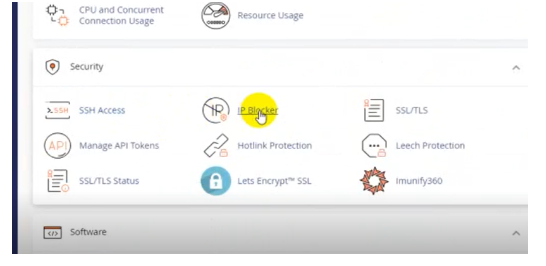
- Scroll down to the security section. Select IP Blocker option.
4. In the new page, add Domain. Then click ‘add’ button
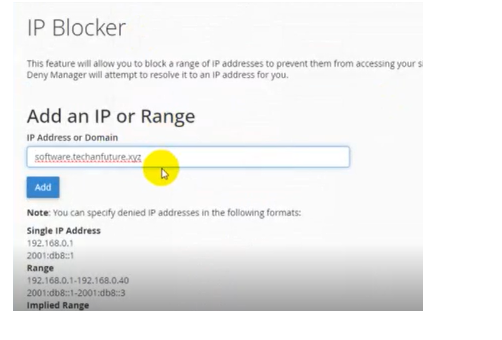
5. After redirection to a new page select “Go back” option.
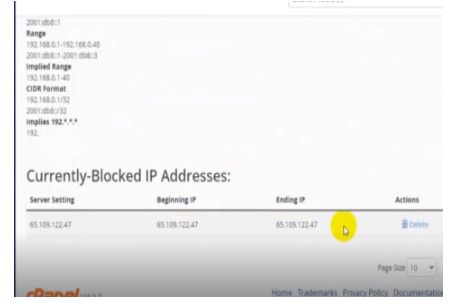
6. Scroll down to see to see Currently Blocked IP addresses.
Ha estat útil la resposta?
Articles Relacionats
How can I download a backup of my site? Please login to your control panel and create a full backup. This may take a few minutes to...
How to Install WordPress with One Click App Today we will show step by step guide on how to install WordPress with one click. Login to C...
How to Install WordPress with One Click App Today we will show step by step guide on how to install WordPress with one click. Login to C...
How to Update Name Server ‘Domain’ and ‘Hosting’ are two different services. Domain and Hosting are synchronized by the...
How to Update Name Server ‘Domain’ and ‘Hosting’ are two different services. Domain and Hosting are synchronized by the...
Powered by WHMCompleteSolution