How to Update Name Server
Drucken- Cpanel, cpanel software, name server
- 15
‘Domain’ and ‘Hosting’ are two different services. Domain and Hosting are synchronized by the support of Name Server. When we visit any domain like www.example.com our web browser first connects with this domain. This www.example.com is converted to IP-address and connection is made between web-browser and domain. As a result, we can see and interact with the webpage.
In this web-blog tutorial we will see how we can update Name Server from domain control panel on our ‘Bitbyhost’ website.
1. Visit www.bitbyhost.com
2. Click the Login icon in the top-right corner and login with your email and
password.
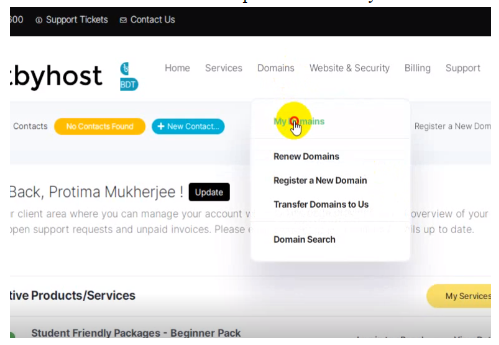
3. Click ‘Domains’ and in the dropdown select ‘My Domains’
4. Here you will see all the domains that are active, and use select the domain that you want to update the Name server
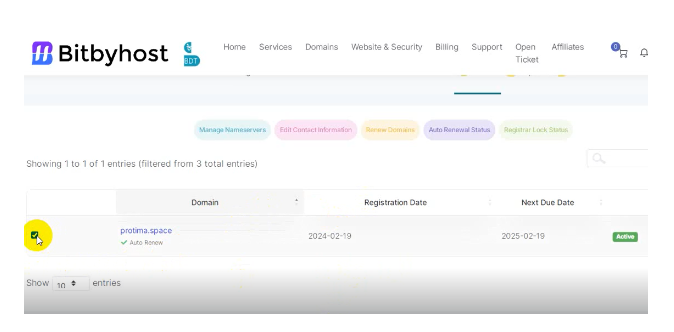
5. Select manage Nameservers. Scroll down and select ‘Use custom nameservers’ radio button
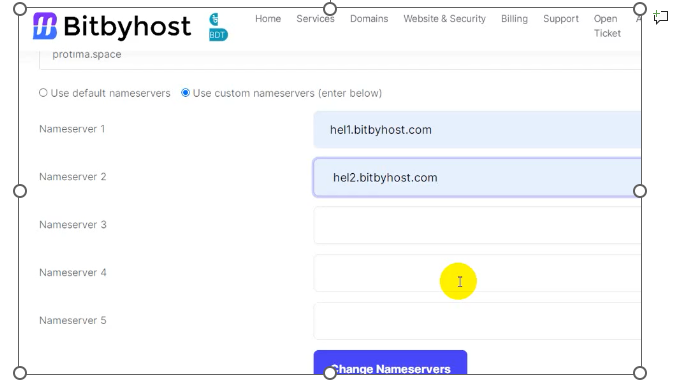
6. In the Nameserver fields provided your nameserver.
7. [Optional Note:] Find your account information related to hosting service mail in your email when you made the purchase. Or contact your hosting provider and they will give you the required details of your nameserver information.
8. Finally click ‘Change Nameservers’.
9. Changing Nameservers can take 12-24 hours maximum. Or it may take 2-3 hours.
War diese Antwort hilfreich?
How can I download a backup of my site? Please login to your control panel and create a full backup. This may take a few minutes to...
How to Install WordPress with One Click App Today we will show step by step guide on how to install WordPress with one click. Login to C...
How to Install WordPress with One Click App Today we will show step by step guide on how to install WordPress with one click. Login to C...
How To Create FTP account in C Panel File Transfer Protocol, also known as FTP, is a systematic way to upload, download and transfer...
How To Create FTP account in C Panel File Transfer Protocol, also known as FTP, is a systematic way to upload, download and transfer...
Powered by WHMCompleteSolution